In the previous blog post I left off at the point where I had started downloading a great many Hungarian decisions that may be of interest to practising lawyers. Since then I have collected 13,000 decisions of the Constitutional Court, 7,890 decisions of the competition authority and related court decisions, 1,918 position statements of the Hungarian National Bank (MNB), 519 documents of the data protection authority (NAIH), 4,654 decisions of the National Trade and Consumer Protection Authority, 24,600 Media Council decisions out of the decisions of the National Media and Infocommunications Authority (NMHH), 885 decisions of the copyright and industrial property expert boards, 1,540 disciplinary decisions of the bar associations, several thousand published notices on agricultural land transactions (land-use and sale contracts), and more than 225,000 decisions from the Collection of Court Decisions (BHGY).
The first step is to bring the decisions that matter to me into a uniform, machine-readable format. The disciplinary decisions of the bars were downloaded as plain text, but in the case of the BHGY, for example, every decision up to 2022 was produced in the so-called Rich Text Format (.rtf)1 and “.docx”, that is, OOXML format2. The decisions of the Constitutional Court and the Media Council are in HTML, well known from websites, and the domain-name decisions are sometimes in PDF3, sometimes in HTML. PDF is very popular elsewhere too: the contracts covered by the land transaction notices, and the MNB, the competition authority (GVH), the trade and consumer protection authority (NKFH) and the expert boards of the Hungarian Intellectual Property Office (SZTNH) all publish only in such formats.
If we take a somewhat closer look at the downloaded files, even within a given format we find further differences that mean more work is needed before the files can be read together. It is also true that the “cleanliness” and the IT reliability of the published decisions differ a great deal. In the BHGY, for instance, up to 2022 about 1% of the decisions contain obvious recognition errors that stem from the fact that the source decision was not created electronically but was converted from a paper original by character recognition (Optical Character Recognition, OCR). One such error is when the case number or page number that normally sits in the header or footer ends up in the body text of the decision: between 2003 and 2014 we find this error in 2–4% of the decisions, and from 2015 on it is below 0.5%. Or take the GVH decisions: in 1,876 of them the letters ő and ű had been wrongly marked as dotless i in the text layer of the PDF. A human reading the visible page does not notice this, but for a machine the word “előfizető” (“subscriber”) became “elıfizetı”. The cause was the faulty configuration of one or two of the tools used to create the PDFs, and it affected the decisions of 2007–2010. In about 46 decisions, the GVH prevented OCR from being run on them. The toughest nut is of course the series of land registry notices, where we meet very different scanning quality. Some are digitally signed, but we can find everything up to the administrative textbook example of “bad scans”: skewed pages, faint and blurred letters, low-resolution photocopies and so on.
PDF is a versatile format, so some PDFs may contain only images (see, for example, the contracts attached to the land transaction notices), with no selectable, copyable text. In such cases I have to run OCR on the images ourselves, and either extend the PDF with the recognised text elements or save the recognised text in a separate text file. Most PDFs already contain some machine-readable text: in the page content description (page content stream) there are text elements, and these can be read and exported without character recognition.
My post today is about this interconnected set of problems: the difficulties of OCR (including the options available to lawyers). The next part will be about the intricacies of data cleaning.
Optical character recognition, OCR
The aim of OCR is to produce directly machine-readable text from any image. The source may be a scanned document, a photograph or even a PDF file.
Until the 1970s, OCR worked mostly when some mainframe computer had to read writing made specifically for the purpose (magnetic ink or a dedicated typeface). By then computers were powerful enough that, instead of matching one specific letter form, they could recognise how letters are formed and their shape characteristics, and besides fixed-width (e.g. typewriter) typefaces they could also recognise the so-called proportional typefaces used in printing. This was called “omnifont” recognition, recognition of any typeface, which until recent decades was more a bold goal than a real capability. The main approach of OCR at that time was that the program produced a small “summary”, a vector description, of the scanned letters by mathematical methods, following instructions assembled by hand by engineers: the program reduced the letters to a skeleton, determined various geometric properties (how many endpoints, crossings and loops it has), and measured which directions the lines run in, or how many dark pixels there are, within a given grid. From these features it then guessed the actual letter using various statistical methods. This was called feature extraction. From the 1990s on, the statistical methods used by engineers became ever more complex and more reliable, and more and more machine learning methods were used that the AI Act today already regards as real AI, e.g. Support Vector Machines and Hidden Markov Models. Then, thanks to the progress of AI, by the early 2010s multi-layer (deep) artificial neural networks became capable of replacing hand-crafted feature extraction.
The really successful OCR solutions from 2015 onwards all began to use multi-layer neural networks for character recognition4. An important example is Tesseract, originally developed by HP, then made open source and developed further by Google, which is available in very good quality for Hungarian as well. Earlier versions of Tesseract extracted the hand-made features described above; from version 4 on, character recognition switched to the LSTM method. First a traditional software library determines where the text blocks and lines to be recognised are, then cuts the text into strips of equal height and feeds them one after another to the neural networks: the task of the first (a Convolutional Neural Network, CNN) is to read the edges and strokes of the letters (the “features”) out of the pixels, and then the LSTM, after taking in the features, outputs the probable letters and text. We shall see below that even these methods are fantastically accurate and, for good-quality printed text, work with a minimal error rate. On today’s computers they are fast enough, and their great advantage is that their resource needs are relatively small: they run reliably even on a home machine or laptop, so the data to be recognised generally does not have to be sent to third parties for recognition.
With poor-quality documents, or, heaven forbid, handwriting, even these LSTM-based OCR tools struggle, even when the human eye can read the same text without trouble or with a little practice. We may say that in such a case the fault lies not with the OCR software but with the quality of the scan, but in daily work that does not always help. It is worth trying to read a few such pages to see what method people use to read individual words, and for which the LSTM method is not suited. A typical such “trick” is guessing from the context what the otherwise illegible word might have been: in a 1915 contract of sale (“adás-vevési”), for example, an experienced lawyer easily reads out the words “albetét” (a sub-entry in the land register), “telekkönyvi bejegyzés” (land register entry) or “bekebelezés” (registration of a right), while a lay reader cannot.
Technical progress did not stop in OCR either. Among multi-layer deep neural networks, the most successful architecture today is neither the CNN nor the LSTM, but the transformer architecture developed by Google in 2017, which also runs behind ChatGPT and its peers. The capabilities of large language models have opened new frontlines for OCR too. The newest and best OCR solutions are called visual language models (VLMs). In the first step, an encoder-type model (ViT = vision transformer) turns the source image into a sequence of small image tokens; in the next step it translates these image tokens into text embeddings that a language model can also take in (the so-called projector); and finally a large language model, specially trained for this “translation” purpose, receives the image tokens and the task of turning the image tokens into text (it almost always receives the prompt “transcribe the page into text”).
These models are already able to take a much wider context into account than before when determining the probabilities of words and letters, and thereby they achieve much higher-quality text recognition. They are far better than LSTM models at reading old and handwritten texts. Their big drawback is that, compared with LSTMs, they are more prone to hallucinating whole (plausible!) sentences, which is much harder to notice. On harder tasks they are more prone to get stuck in a loop, the end result of which is 100% unusable text. And their most serious drawback is that they need much more computing power than LSTM models. The best-performing of these VLMs will in all likelihood not even start on a home machine; they also need units capable of fast parallel matrix processing, such as a GPU5, with an amount of memory that most law firms would not find worth investing in. When it comes to recognising words that belong to the context, VLMs of course cannot compete with specialists either, but the very aim here is to minimise human involvement in every recognition step; nobody envies the artificial neural networks this work.
The OCR experiment
By way of illustration, let us look at an experiment. From the downloaded datasets mentioned in the introduction and from my own collection, I put together a small package for performance measurement (“evaluation”).
Parts of the package
Good-quality HU = GQ_HU
The package contains easily readable Hungarian legal text, e.g. from the PDFs of the NAIH, NMHH and SZTNH, about 30 pages. These are all good-quality, electronically created documents, not scanned, and the usual distortions of scanning (shadows, skewed scans, shifts) do not impair legibility either. This is generally a good indicator of the quality at which text can be extracted again if an image created in an electronic original has no text layer, if it was damaged, or if the text layer in the PDF is protected against copying.
Good-quality tables = GQ_HU_tab
It is worth examining the recognition of the tables in the dataset separately, because recognising tables requires a special ability: keeping the order of the fields. Since tables are quite common in Hungarian decisions too, in both criminal and civil law, this deserves separate attention.
Poor-quality HU from the decisions dataset = BQ_HU
Then there is a somewhat harder kind of text, typical of the contracts subject to notice: it is in Hungarian, but the scanned text has not been OCRed, and on top of that it is of the quality, euphemistically called suboptimal, that is often typical of domestic administration; 16 pages of this.
Old prints HU = nyomat_HU
There are also some really hard nuts, although their source is not my dataset above but an old collection of mine: 11 pages of mixed material from 19th-century prints, a real estate “sale” contract concluded in 1918, 1919 and 1940 (a pre-printed form filled in by a professional of unidentifiable occupation), and then sale contracts typewritten in 1934, 1942 and 1958, all in Hungarian.
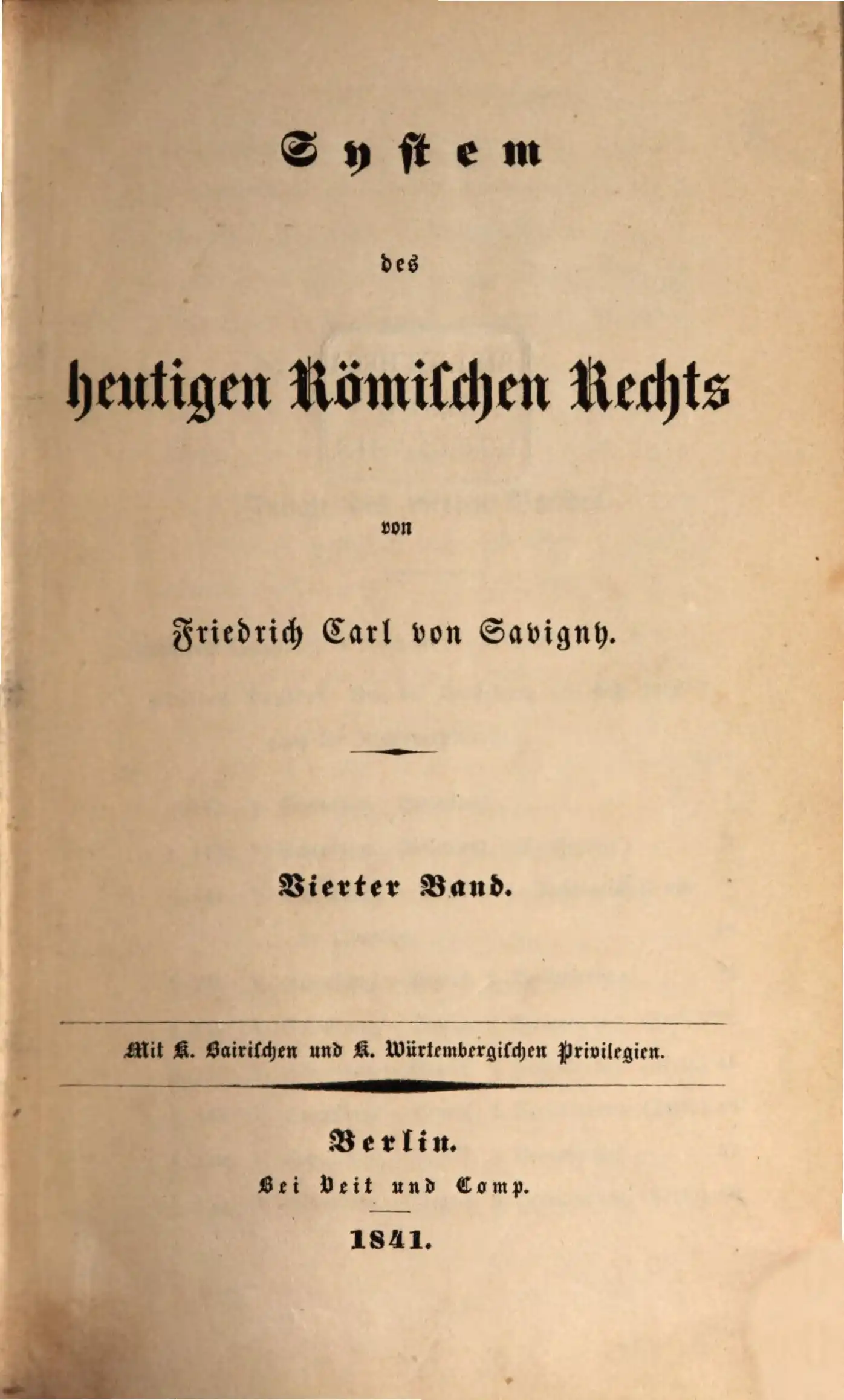
Savigny_fraktur
Another difficult task is how well the various OCR tools recognise 30 pages selected from “System des heutigen römischen Rechts”, the masterpiece of Friedrich Carl von Savigny, published from 1840 on, including the original Fraktur type showing through from the reverse side of the page.
HP_hw_hu, HP_hw_en
The hardest part is of course left for last: recognising my own handwriting. Unfortunately I found only 3 finished pages of Hungarian handwriting, but 13 pages of English handwriting.
The metrics
Three metrics are worth using to interpret the results:
CER (Character Error Rate) shows how many characters were wrongly recognised compared with the reference text ((substitutions + deletions + insertions) / number of characters in the reference text). For example, if “a vadlott bűnös” is produced instead of “a vádlott bűnös” (“the defendant is guilty”), the ratio of 1:15 gives a CER of 6.7%; for old handwriting, a CER of around 10% already counts as a very good value.
WER (Word Error Rate) shows the word error rate; in the previous example the error rate is 33% (1/3).
Accent error rate (replacements and deletions of accents divided by the total number of accented characters).
The models/OCR tools used
Tesseract (5) is the free, open-source solution mentioned above. It works with the LSTM technique, so it does not use visual language models, and it runs at an acceptable speed on almost everyone’s own machine. It has its own Hungarian model (there is a fast version and a good-quality, slower version; I used the latter) and also a German model made specifically for Fraktur. In the same category I also tried EasyOCR and PaddleOCR; these are also freely downloadable LSTM OCR programs. Their advantage over Tesseract is that, in theory, they can also make use of the GPU available in the computer, but as we can see, that did not make them significantly faster.
For comparison I also tried an older, version 15 of ABBYY FineReader Corporate, but running all the test pages would have taken an unreasonable amount of time, since the scans would have had to be started by hand and the results evaluated afterwards. In any case, according to an earlier, much more extensive study that is not included in the tables below, the solution had no significant quality advantage over Tesseract, and it was much slower (this was due to the old version). Therefore I left this software out of the full measurement.
I ran the above “classic” OCR programs on my own machine: Tesseract on an i5-14400F processor, and EasyOCR and PaddleOCR on a GTX 1650 Super graphics card (they needed only 2.7 GB of memory). With Tesseract I used the German Fraktur model on the Fraktur pages, the Hungarian model on the rest, and the English model for the English handwriting.
Of the newer-generation, VLM-based solutions I tried the following:
- Qwen3-VL-8B (about 8.8 billion parameters): a general-purpose vision-language model (VLM) of Alibaba’s Qwen family, not made specifically for OCR. About 18 GB; it runs on a 24 GB card.
- Qwen3-VL-32B (about 33 billion parameters): the larger member of the same family. About 67 GB, so it only just fits on an 80 GB card (e.g. NVIDIA H100); for comfortable running a 141 GB card (H200) is justified.
- Qwen2.5-VL-72B (about 73 billion parameters): the largest member of the previous generation of Alibaba’s Qwen family. At full precision it would need about 147 GB, so even on the H200 I ran it only with 8-bit (fp8) compression, quantisation, which brought a slight loss of quality relative to the original model, but also a speed-up.
- olmOCR-2 (about 8 billion parameters): a model of the company called Allen AI, fine-tuned specifically for converting documents to text, built on Qwen2.5-VL-7B. Running it requires a 24 GB card.
- GLM-OCR (about 1.3 billion parameters): a small model from Zhipu AI made solely for OCR. It already fits on an 8 GB card (but even this exceeded the size of my own card).
I ran the above VLM models on an NVIDIA H200 card with 141 GB of memory, rented from Hyperbolic. The full measurement included further models (Chandra, Gemma 3, PaddleOCR-VL, HunyuanOCR), but I do not report their results here, because their results were worse overall than the others.
The results
In the tables, “-“ indicates that the given test was not run with the given program. EasyOCR and PaddleOCR were run only on the good-quality Hungarian pages, and Qwen2.5-VL-72B was not run on the simple page package.
Character error rate (CER, %, lower is better)
| program | GQ_HU | BQ_HU | nyomat_HU | Savigny_fraktur | HP_hw_hu | HP_hw_en |
|---|---|---|---|---|---|---|
| Tesseract | 0.8 | 28.0 | 33.5 | 4.8 | 88.8 | 70.1 |
| EasyOCR | 3.0 | - | - | - | - | - |
| PaddleOCR | 0.4 | - | - | - | - | - |
| olmOCR-2 | 3.6 | 13.5 | 10.1 | 3.2 | 44.6 | 7.5 |
| GLM-OCR | 5.0 | 24.6 | 10.9 | 5.5 | 39.5 | 7.7 |
| Qwen3-VL-8B | 0.6 | 20.3 | 10.5 | 45.6 | 42.9 | 7.2 |
| Qwen3-VL-32B | 0.7 | 18.5 | 10.2 | 4.5 | 39.3 | 14.1 |
| Qwen2.5-VL-72B (fp8) | - | 21.1 | 10.0 | 6.9 | 36.6 | 7.8 |
The result of Qwen3-VL-8B is spoiled by a single page on which the model got “stuck in a loop”: it kept repeating the same sentence about the marriage of freed people (libertini) endlessly. The result of Qwen3-VL-32B on the English handwriting was spoiled by similar loops.
Word error rate (WER, %)
| program | GQ_HU | BQ_HU | nyomat_HU | Savigny_fraktur | HP_hw_hu | HP_hw_en |
|---|---|---|---|---|---|---|
| Tesseract | 3.5 | 43.1 | 60.0 | 10.5 | 98.6 | 96.1 |
| EasyOCR | 17.9 | - | - | - | - | - |
| PaddleOCR | 2.6 | - | - | - | - | - |
| olmOCR-2 | 4.6 | 17.1 | 31.4 | 5.7 | 75.2 | 15.1 |
| GLM-OCR | 9.6 | 36.6 | 37.1 | 14.0 | 79.5 | 15.6 |
| Qwen3-VL-8B | 1.5 | 20.3 | 30.3 | 48.9 | 66.6 | 15.1 |
| Qwen3-VL-32B | 1.4 | 22.3 | 28.9 | 7.8 | 62.5 | 19.0 |
| Qwen2.5-VL-72B (fp8) | - | 26.1 | 31.7 | 11.2 | 70.0 | 17.7 |
Accent error rate (%, Hungarian-language tests only)
| program | GQ_HU | BQ_HU | nyomat_HU | HP_hw_hu |
|---|---|---|---|---|
| Tesseract | 0.2 | 24.9 | 34.9 | 95.7 |
| EasyOCR | 11.3 | - | - | - |
| PaddleOCR | 1.9 | - | - | - |
| olmOCR-2 | 0.5 | 10.9 | 9.5 | 68.7 |
| GLM-OCR | 5.9 | 16.7 | 18.9 | 67.2 |
| Qwen3-VL-8B | 0.3 | 13.7 | 5.7 | 55.9 |
| Qwen3-VL-32B | 0.2 | 13.7 | 6.3 | 49.9 |
| Qwen2.5-VL-72B (fp8) | - | 7.8 | 9.0 | 61.8 |
Table recognition (GQ_HU_tab)
For tables I measure neither character nor word errors, but the percentage of table cells in the recognised text that match the reference (cell F1, higher is better), and on how many pages the model returned a table with exactly the same number of rows and columns as the reference (out of 12 measurable pages). The classic programs return only plain text, not tables, so they do not appear here.
| program | cell F1 (%) | exact row and column count (out of 12 pages) |
|---|---|---|
| Tesseract | - | - |
| EasyOCR | - | - |
| PaddleOCR | - | - |
| olmOCR-2 | 85.7 | 6 |
| GLM-OCR | 90.9 | 6 |
| Qwen3-VL-8B | 98.6 | 11 |
| Qwen3-VL-32B | 98.1 | 11 |
| Qwen2.5-VL-72B (fp8) | 94.9 | 9 |
Speed
For the classic programs, the time per page is the number of seconds measured on my own machine. For the language models, I divided the total running time measured on the H200 card by the number of pages (the models processed 8 pages at a time, excluding the model loading time, which was a few more minutes per model), so the figures of the two groups cannot be compared one to one. Qwen3-VL-32B looks slower because on a few pages the model got stuck in a loop and wrote until the longest output allowed.
| program | hardware | GQ_HU (s/page) | all tests (s/page) |
|---|---|---|---|
| Tesseract | processor | 3.7 | 2.7 |
| EasyOCR | GTX 1650 Super | 5.5 | - |
| PaddleOCR | GTX 1650 Super | 2.8 | - |
| olmOCR-2 | H200 | 1.2 | 1.2 |
| GLM-OCR | H200 | 0.7 | 0.5 |
| Qwen3-VL-8B | H200 | 1.7 | 2.8 |
| Qwen3-VL-32B | H200 | 4.9 | 8.4 |
| Qwen2.5-VL-72B (fp8) | H200 | - | 5.2 |
About the references
The reference for the Fraktur pages is the carefully checked transcription of the Deutsches Textarchiv. For the good-quality Hungarian pages it is the PDFs’ own text layer, and for the tables it is the table extracted from the PDF by machine (I did not check this by hand). The reference for the old prints started from the text layer of an earlier OCR program, and that for the contracts subject to notice from the output of Tesseract, and I corrected both by hand throughout (one page of the old prints, a handwritten contract, was first rewritten by a language model, and I corrected that). The transcription of the handwritten pages was also first produced by a language model from the images, and I corrected it line by line (for the Hungarian handwriting this meant many corrections, for the English hardly any). Since I made the corrections on the basis of a language model’s first transcription, the reference may slightly resemble the typical reading of language models, so the figures for the handwriting tests are best treated as approximate.
A few observations
- On simple, good-quality Hungarian pages (GQ_HU) the Qwen3-VL models and the classic PaddleOCR and Tesseract all work with a character error rate below 1%. In word error rate, the Qwen3-VL models (about 1.5%) come ahead of the classic programs (2.6–4.6%).
- On harder, scanned, old or handwritten material the classic programs are much worse: on the contracts subject to notice Tesseract’s character error rate is 28%, and on Hungarian handwriting it already gets nearly 100% of the words wrong.
- There is no single winner: olmOCR-2 is the best on printed and scanned pages (including the contracts subject to notice), Qwen3-VL on tables, and the largest model (72B) on Hungarian handwriting and old prints. The advantage of the latter is visibly small, and the test is based on only 3 pages of Hungarian handwriting.
- Even the best models read Hungarian handwriting with a character error rate of only about 37–45%, and a good part of the errors is plausible-sounding text that is not on the page (for example “gyermekkort, adóeljárás” (“childhood, tax procedure”) ends up in the text instead of “gépjárműgyártás, adóeljárás” (“motor vehicle manufacturing, tax procedure”)), which is hard to notice when reading. For processing large volumes of old handwriting, it is justified to use dedicated, paid models for this purpose (such as Transkribus).
To sum up: we can see that, apart from the extreme, handwritten cases, everyone can safely use the best freely available Hungarian Tesseract models. The more expensive, VLM-based OCR is worth using only for very difficult documents, such as processing handwriting or repairing large quantities of illegible documents. Beyond that, I can wholeheartedly recommend it to any organisation where it is still customary to write by hand on printed file covers, e.g. office instructions.
Microsoft’s own public specification, created to ease document exchange between different word-processing tools. ↩
A public standard submitted by Microsoft but published by the standardisation bodies, ISO/IEC 29500. ↩
The Portable Document Format is a very versatile page description language and data storage format, developed by Adobe Inc. and standardised in 2008 as ISO 32000. Because of its versatility, it is practically an impossible expectation that every PDF reader should handle every variant of it perfectly. ↩
The typical method at that time was the so-called Long Short-Term Memory (LSTM) neural network. As Europeans, it is worth remembering that the theory was worked out in 1997 by two German researchers, Jürgen Schmidhuber and Sepp Hochreiter, making it possible for neural networks not to forget what they had learned earlier, even beyond a certain size and complexity. However, until about 2012 the great majority of computers were not powerful enough to use or even try out the algorithm. When, however, in 2012 many areas of language processing switched to this method (including speech and text recognition and translation), it meant a revolutionary improvement in quality. ↩
Graphics Processing Unit, but this category can also include the Tensor Processing Units made by Google, which are less visible to consumers. ↩

